
What is a Listener?
A Listener is a saved set of instructions that tells Earshot which Reddit communities to watch and what to look for. Think of it as a pair of ears pointed at the conversations you care about.
Each Listener:
- Monitors specific subreddits (Reddit communities)
- Filters posts and comments using keywords and other rules
- Runs on a schedule you set (every N minutes)
- Surfaces matches as drafts (Solo) or monitored posts (Scout)
You can have multiple Listeners — for example, one watching founder communities and another watching developer tool discussions.
The goal isn't maximum drafts. It's high-intent threads where you can genuinely help. Tuning is iterative — expect to adjust weekly for the first few weeks.
Creating a Listener
Go to Listeners → New listener. The form walks you through five sections.
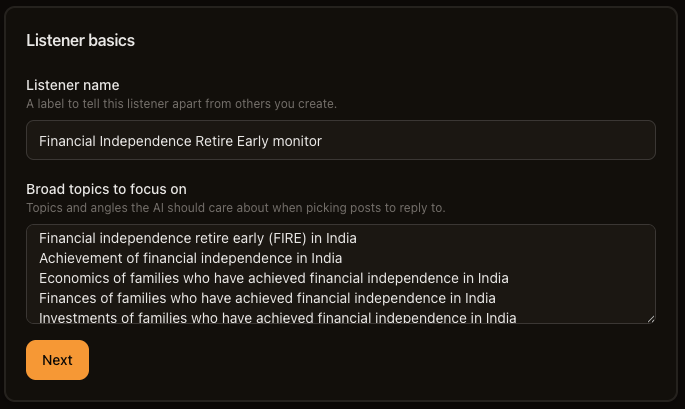
Listener basics
| Field | What it does |
|---|---|
| Listener name | A label to tell this listener apart from others you create. |
| Broad topics to focus on | Topics and angles the AI should care about when picking posts to reply to. |
Click Next. Earshot suggests communities based on your topic text.
Communities
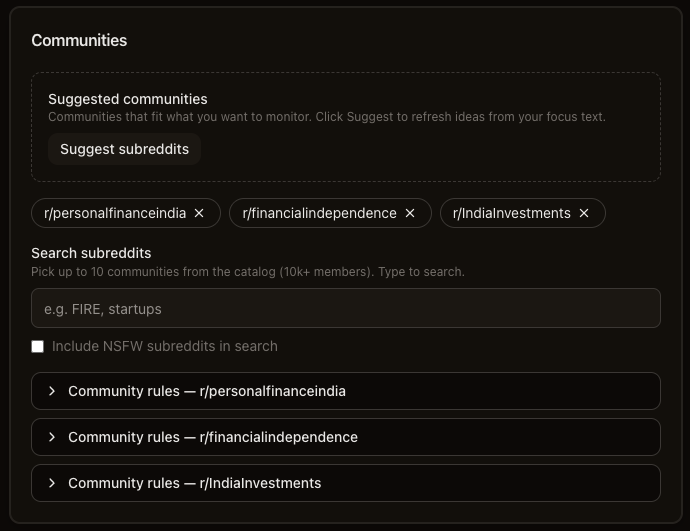
- Suggested communities — click Suggest subreddits to refresh ideas from your focus text, then Add the ones that fit.
- Search subreddits — type to search the catalog (communities with 10k+ members). Pick up to your plan's subreddit limit per Listener.
- Community rules — for each selected subreddit, expand Community rules — r/{name} to read moderator rules. This will give you an idea on what's allowed in each subreddit BEFORE you start listening.
Keyword configuration
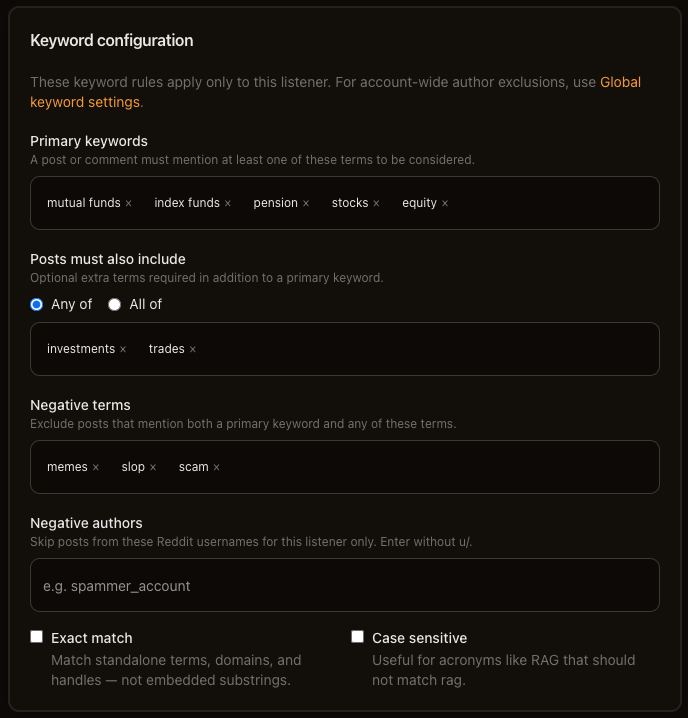
| Field | What it does |
|---|---|
| Primary keywords | A post or comment must mention at least one of these terms to be considered. Required — at least one. |
| Posts must also include | Optional extra terms. Choose Any of (match any secondary term) or All of (must match every secondary term). |
| Negative terms | Exclude posts that mention both a primary keyword and any of these terms. |
| Negative authors | Skip posts from these Reddit usernames for this listener only. Enter without u/. |
| Exact match | Match standalone terms, domains, and handles — not embedded substrings. On by default. |
| Case sensitive | Useful for acronyms like RAG that should not match "rag". Off by default. |
These rules apply only to this Listener. For account-wide author exclusions, see Global keywords below.
Global keywords
Settings → Global keywords blocks authors account-wide:
| Level | Where | Scope |
|---|---|---|
| Per-listener | Negative authors on the Listener form | This Listener only |
| Account-wide | Settings → Global keywords → Negative authors | All Listeners |
Help text on the settings page: "Posts from these authors are skipped across all listeners." There are no global keyword inclusions — only author exclusions at the account level.
Posts and comments
In the app this section is labeled: What to watch for.
| Field | What it does |
|---|---|
| Watch for | Comments, Posts, or Both. |
| Check every (minutes) | How often this Listener runs. Minimum 10 minutes; maximum 24 hours (1440 minutes). Click Suggest for a recommendation based on subreddit activity. |
| How deep in the thread? | Shown when watching comments. Top-level comments only or I'm okay with more depth (replies to top-level comments). |
On Solo, you'll also see Writing voice (attach a Persona) and Knowledge bases (attach reference docs) before the final section. Both are optional. Scout hides these cards.
Fine tuning
In the app this section is a collapsible card titled Fine-tuning.
| Field | What it does |
|---|---|
| How strict should filtering be? | Loose lets more through; Medium is balanced (default); Tight is more selective. |
| Minimum comment length | Ignore comments shorter than this many words. Default: 8. (the default skips short comments which don't add much value) |
| Skip downvoted comments | Don't draft replies for comments with a negative score. On by default. (the default skips downvoted comments which are likely not worth replying to) |
Click Create listener. You'll land on the edit page for your new Listener.
Editing a Listener
On the edit page, all sections are visible at once. The main difference from create:
- Active toggle — Run this listener on schedule. Turn off to pause scheduled checks.
- Attached knowledge bases — Remove existing links or Attach new ones with the Add knowledge base dropdown.
Save your changes when done.
Listener runs
Listeners run automatically on the schedule you set.
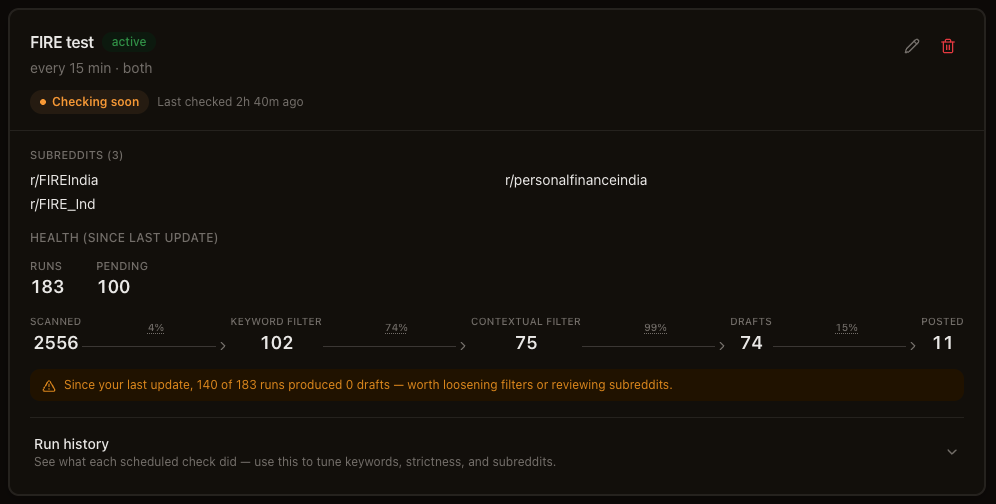
On each listener card you'll see:
- Next check in {time} — when the next scheduled run is due
- Last checked {time} ago — when the last run finished
- Paused — if you've turned off the Active toggle
- Checking soon — if the Listener has never run yet
While a run is in progress, you'll see Running pipeline… with a progress bar.
Health funnel
Each card shows a Health section with a funnel:
Scanned → Keyword filter → Contextual filter → Drafts (Solo) or Matches (Scout) → Posted
| Pattern | Likely cause | Fix |
|---|---|---|
| High scanned, low keyword filter | Keywords too broad or too few | Add negative terms, tighten primaries |
| High keyword, low contextual | Strictness too tight or focus text too narrow | Loosen strictness, broaden your topic description |
| High contextual, low drafts | (shouldn't occur ideally) Solo draft limit or processing issue | Check daily limit |
| High drafts, low posted | You're rejecting a lot (that's OK!) or not posting yet | Review draft quality, tune Persona/KB |

Run history
Expand Run history on a listener card to see what each scheduled check did — duration, items scanned, keyword and contextual filter counts, and drafts produced. Use this to tune keywords, strictness, and subreddits.
Scout vs Solo differences
| Feature | Scout | Solo |
|---|---|---|
| Output label on card | Matches | Drafts |
| Writing voice (Persona) | Hidden | Available |
| Knowledge bases | Hidden | Available |
| Listener limit | Up to 3 | Up to 10 |
| Subreddits per Listener | Up to 6 | Up to 10 |
What's next
- Planning your Listeners — split business and personal Listeners
- Personas — shape how Solo drafts sound
- Drafts — review and post your matches
- How Earshot works — how Listeners fit with Personas, KBs, and Drafts